


Lineage 2 Clan Crests — Create and Download Free
Create unique L2 clan crests and alliance emblems online for free! Our generator supports the correct format 16×12 BMP 256 colors for clan and 8×12 BMP for alliance. Gallery of 500+ ready-made emblems for download.
Create Online Clan and Alliance Crests
Ready-made emblems, badges for clan, alliance l2
Click on the icon and it will appear in the fitting room in the screenshot above. Refresh the page if all icons have not loaded.


L2 Crest Maker Program for Windows
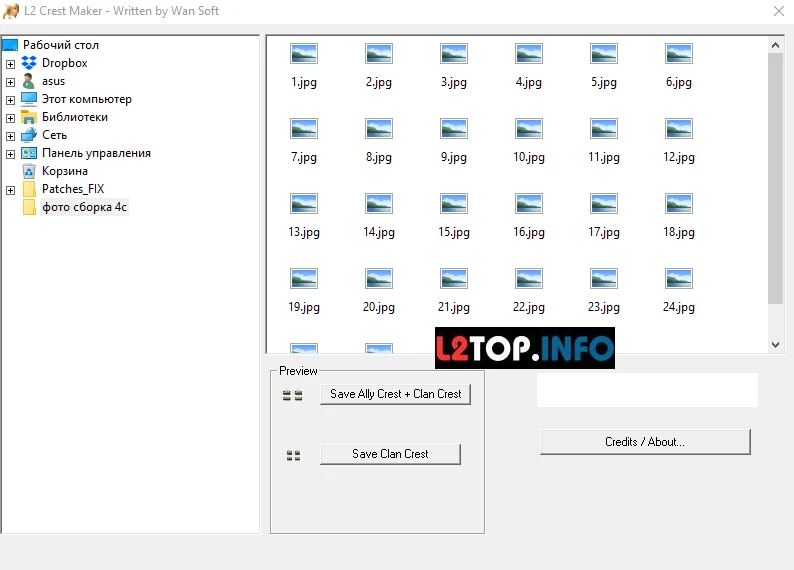
Create Professional Emblems for Lineage 2 Offline
L2 Crest Maker is a free portable program for Windows that allows you to quickly create unique clan crests (16×12) and alliance (8×12) from any images. No installation required — just extract and run.
Main Features:
- Two modes: create separate clan crest or clan + alliance pack
- All formats supported: JPG, PNG, GIF, BMP
- Portable version: no installation required, works from any drive
- Automatic conversion: program creates correct BMP files for Lineage 2
- Simple interface: entire process takes 3 clicks
How to Use:
- Download archive from one of the links below and extract
- Run L2_Crest_Maker.exe
- Select source image on computer
- Specify mode: clan only (16×12) or clan + alliance (8×12 + 16×12)
- Click "Save" and choose folder for ready files
Tip: If game doesn't accept created files, make sure they are saved in BMP format with 256 colors.
Download L2 Crest Maker:
Archive password - l2top.infoSize: ~2 MB | Platform: Windows XP/7/8/10/11 | License: Freeware
Online vs Program:
Online generator (on this page) is convenient for quick crest creation from any device without downloading. L2 Crest Maker program suits those who prefer working offline or create crests regularly.
Creating and Installing Lineage 2 Clan Crests
Create unique L2 clan crests and alliance emblems online without programs! Our generator supports the correct format 16×12 BMP 256 colors for clan and 8×12 BMP for alliance, which Lineage 2 Interlude and all modern chronicles accept.
How to Set Clan Crest in L2
1. Create Emblem
Upload any image (JPG, PNG, GIF) to generator above. Select area for clan and alliance crest using interactive crop frame.
2. Download Files
Click "Create Crests" and get ready BMP files: 16x12.bmp (clan) and 8x12.bmp (alliance) in ZIP archive.
3. Install in Game
Enter game as clan leader (CL), open clan menu and upload files via "Set Crest" button. Clan must be 3+ level.
L2 Clan Crest Format: Technical Requirements
Lineage 2 accepts only BMP 8 bit (256 colors) files. Wrong format is the most common reason why game doesn't accept emblem.
| Type | Size | Format | Filename |
|---|---|---|---|
| Clan | 16×12 pixels | BMP 8-bit, 256 colors | 16x12.bmp |
| Alliance | 8×12 pixels | BMP 8-bit, 256 colors | 8x12.bmp |
Important: Our online generator automatically converts any image to correct BMP 256 colors format. You don't need to use Photoshop or other editors!
How to Install Clan Crest in L2 Interlude (Step by Step)
-
Requirements:
- You must be clan leader (Clan Leader)
- Clan must be minimum level 3
- Emblem files in BMP 8-bit format
-
File Preparation:
Create crests via generator above or download ready ones from gallery below. Extract ZIP archive on computer.
-
Installation in Game:
- Open clan menu (Alt+N)
- Click "Clan Crest" or "Set Crest" button
- Select
16x12.bmpfile for clan - If needed — upload
8x12.bmpfor alliance ("Alliance Crest" button) - Confirm upload
-
Verification:
Emblem will appear above clan members' heads and on shields. If crest doesn't display — relog to game.
Common Problems and Solutions:
- "Format not supported" — file must be BMP 8-bit, not PNG/JPG
- "Wrong size" — check: clan exactly 16×12, alliance 8×12 pixels
- "Button inactive" — clan must be minimum level 3
- "Emblem not visible" — do logout/login or restart client
Ready Crests for L2 Clan — Download Free
Below is a gallery with more than 500 ready emblems for Lineage 2 clans and alliances. All crests are already in correct format 16×12 BMP 256 colors — download and immediately upload to game!
🎨 Variety of Styles
Dragons, shields, swords, magic symbols, coats of arms, logos, abstractions
👁️ Online Preview
See how emblem looks on character in game before downloading
💾 Ready Clan+Alliance Pairs
Most emblems available as pack: 16×12 (clan) + 8×12 (alliance)
✅ Correct Format
All files BMP 8-bit, no need to convert — straight to game!
⬇️ Scroll down to see full crest gallery
Images for L2 Clan: Sources and Ideas
If you want to create unique emblem instead of using ready one from gallery, here are best sources for Lineage 2 clan images:
- Coats of arms and shields: search "medieval coat of arms", "fantasy shields", "heraldic symbols"
- Game themes: logos from Diablo, WoW, Dark Souls, Warhammer
- Dragons and creatures: "dragon silhouette", "phoenix icon", "wolf emblem"
- Symbols and runes: "celtic symbols", "norse runes", "magic circles"
- Font logos: create clan name letters in Photoshop or online editors
Tip: For small 16×12 size, high contrast images with clear lines work better. Avoid small details — they'll merge into pixelated mess.
FAQ About L2 Clan Crests
Can I use GIF or animation for clan crest?
No, Lineage 2 supports only static BMP files. Animated emblems are technically impossible.
How much does it cost to install clan crest in L2?
Emblem installation is free in game. Only clan level 3+ required. Creating crests on our site is also completely free.
Can I make L2 clan crest 16×12 from photo?
Yes! Upload any photo to generator above, select needed area and create BMP file. Note that at such small size details are lost — better use large objects or logos.
How to make clan and alliance crests from one image?
Select "Clan + Alliance" mode in generator. Left third of selected area becomes alliance emblem (8×12), right two thirds — clan emblem (16×12).
Do these crests work on Lineage 2 Classic / Essence / Aden?
Yes, BMP 16×12 and 8×12 format is standard for all Lineage 2 versions and chronicles: Interlude, Gracia, Hi5, Goddess of Destruction, Classic, Essence, Aden.
How to Create and Install Clan Crest in Lineage 2

Download Ready Clan Crests L2, Alliance or Create
To install crest your clan must reach minimum level 3. This is basic requirement without which crest installation is impossible.
Crest Installation Process
Once your clan reaches required level, prepare crest image:
- Create crest image 16x12 pixels in graphics editor. Format: BMP with 256 colors palette.
- Copy crest file to computer, for example:
C:\crest.bmp. - Enter game and press
ALT + Cto open clan panel. - Click
Set Crestand specify path to crest file.
Our online service allows creating unique clan crests easily and free. Use generator above!